
UFC
UFC® - The Ultimate Fighting Championship®Sports
4.64.97K Reviews
- Version
- Varies With Device
- Installs
- 10.00M
- Age Rating
- Teen
Screenshots




Our Review of UFC
 Analysis by Appyee
I find the UFC app most useful when I treat it as a companion to following the sport, rather than assuming every part of the experience is free. It brings news and event information together with routes to watch through pay-per-view or UFC Fight Pass, so it can help me move from hearing about a matchup to deciding how I want to follow it. That distinction matters: the app itself is free to download, but watching certain events or using paid services can involve separate spending.
Choosing how to follow an event
For a casual fan, the strongest everyday use may be checking what is coming up and catching up on UFC news between events. For someone planning to watch live, the app is more of a starting point: I would check the event details, then confirm which viewing option applies before fight night. The available in-app purchases range from one dollar to $334.99 per item, so I would pay attention to what a purchase covers rather than treating the free download as a promise of free access to every broadcast.
That makes it different from a general sports-news app, which may be better if I follow many leagues and want one broad feed. The UFC app is focused on one sport and its organization, which is convenient when I want UFC-specific updates, but less useful as my only sports app. If I mainly want discussion and fan opinions, social platforms may suit that habit better; if I want official UFC news and event access in one place, this app has the clearer purpose.
Making the app work around a busy day
A practical routine is to check the event schedule when I have a quiet moment, note the date, and then return to the app when I want news or viewing information. That is more dependable than trying to remember a card announced during a busy week. If an event matters to me, I would also check the details again near the time it takes place, since schedules and plans are the sort of information worth confirming before rearranging an evening around them.
On a commute, I might use the app for a brief news check rather than plan to watch a live event. At home, I can decide whether a pay-per-view or UFC Fight Pass route makes sense for the particular event. This split is useful: reading about the sport and arranging access to a broadcast are related tasks, but they are not the same thing. A fan who only wants quick headlines can keep the app to short visits, while a committed viewer can use it as part of a more deliberate fight-night plan.
Readability, navigation, and different abilities
The original interface felt organized enough for me to find the main kinds of content without much wandering. That is helpful if I open the app with a specific goal—checking news, looking at an upcoming event, or finding viewing options—instead of browsing at random. I would still recommend taking a moment to learn where those sections sit on your device, particularly if you use a phone one-handed or prefer to keep screen time brief.
Accessibility is not only about visual design. Clear labels, a predictable route back to the main content, and information that can be scanned quickly can make an app easier for people with different levels of confidence using a phone. My experience was that the layout felt approachable, but that does not guarantee it will suit every person or every accessibility need. If small text, dense screens, motion, or a particular interaction style is difficult for you, it is worth testing the app on your own device before relying on it for an important event.
Where the experience has limits
Live viewing on a phone is convenient, but it is not automatically the best way to watch a full fight card. A small screen can make the action harder to follow, and a busy or noisy setting may make it difficult to concentrate on commentary. I would choose a larger screen and a comfortable, stable viewing setup when the event is the main plan; the phone is better as a flexible option when I am away from home or checking details on the move.
There is also a difference between a smooth experience in one session and a guarantee that every viewing situation will be smooth. Streaming depends on the device, connection, and circumstances around the viewer. I would avoid starting a paid viewing option at the last minute without first checking that I can access the service and that my connection is suitable. That small bit of preparation is especially useful if several people are counting on watching together.
Who will get the most from it
I would recommend the app to people who follow UFC regularly, want news focused on the organization, or like having event information close by when planning what to watch. It can also work for newcomers who want a straightforward way to keep up with the sport without first building a routine around several different sources. The developer is UFC® - The Ultimate Fighting Championship®, and the app has an average rating of 4.6 from around 116,000 ratings, with more than 10 million installs.
It is less compelling if you rarely follow UFC, prefer a single app covering many sports, or only want free live video. The app is free, carries a Teen age rating, and has been available since June 21, 2011; it requires Android 7.0 or later. Those details make it accessible to a broad range of Android users, though the Teen label is worth considering for younger viewers and families, particularly because the app is centered on combat sports.
If you are deciding whether to install it, I would start with one simple question: do you want a UFC-specific place to follow news and work out how to watch events? If yes, the app has a useful role. If you want a general sports hub or expect every live event to be included at no cost, a broader news service or another viewing option may fit better. My overall view is that it is most valuable when I use its information to plan, rather than assume the phone app alone removes every barrier to watching.
If you're a fan of mixed martial arts or just love keeping up with the latest sports action, the UFC app is a must-have on your mobile device. I recently gave it a spin, and here's everything I found while diving into this powerhouse of a sports app.
Getting Started with the UFC App
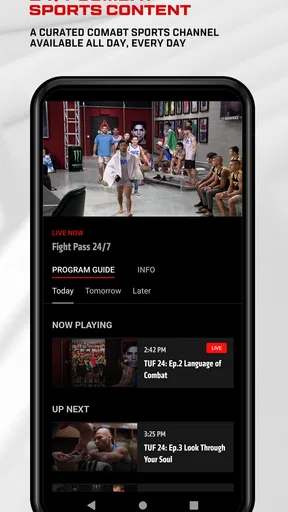
First things first, downloading the app was a breeze. It's available for both Android and iOS, which means you can pretty much access it regardless of your device preference. Once installed, you're greeted with a sleek interface that's both intuitive and visually appealing. The UFC app is your one-stop-shop for all things UFC, offering everything from live event streaming to fighter profiles and news updates.
Exploring the Features
Let's talk about features because, honestly, there's a lot packed into this app. One of the standout features is the ability to watch live events directly from your phone. Whether you're at home or on the go, you won't miss a punch, kick, or takedown. The streaming quality is top-notch, and I didn’t experience any lag, which is a huge plus, especially during intense matches.
Beyond live streaming, the app offers a treasure trove of fighter profiles. You can dive deep into statistics, fight history, and even personal backgrounds of your favorite fighters. It’s like having a mini Wikipedia dedicated purely to UFC fighters.
News and Updates
If you love staying updated on the latest in MMA, the app’s news section is a game-changer. It regularly updates with the latest news, fight announcements, and rankings. It’s like having your own personal UFC news ticker right at your fingertips.
Another feature that caught my attention was the event calendar. You can easily check the schedule for upcoming fights and even set reminders so you don’t miss any action. This is perfect for those of us who have busy schedules but still want to stay in the loop.
User Experience and Interface
The user experience is where the app truly shines. It's intuitive, making navigation a breeze. Everything is neatly organized, so whether you’re a tech novice or a smartphone pro, you’ll find your way around without any hiccups.
The design is sleek and modern, with a dark theme that’s easy on the eyes, especially during late-night browsing sessions. The app’s responsiveness is impressive, and it runs smoothly without any glitches or crashes during my time using it.
Final Thoughts
All in all, the UFC app is a fantastic tool for anyone who loves mixed martial arts. It’s packed with features that not only enhance your viewing experience but also keep you connected to the sport in ways that go beyond just watching fights. Whether you’re a hardcore fan or just getting into the UFC scene, this app has something to offer.
So, if you're looking to keep the octagon action close at hand, give the UFC app a try. It might just become your new favorite way to experience the world of mixed martial arts.
Verdict
Strengths of UFC
- Real-time fight updates and stats.
- Extensive fighter profiles and history.
- High-quality video highlights.
- User-friendly interface and navigation.
- Exclusive content and interviews.
Limitations of UFC
- Requires a stable internet connection.
- Some features need a premium subscription.
- Occasional lag during live streams.
- Limited offline content access.
- Ads can be intrusive for free users.
Similar Picks in This Category
View All
BeSoccer: Soccer Live Score
BeSoccer apps4.3

Cricbuzz - Live Cricket Scores
Cricbuzz.com3.7

NFL
NFL Enterprises LLC2.4

Da Fit
MO YOUNG LIMITED3.6

ESPN
Disney4.5

LiveScore: Live Sports Scores
LiveScore Limited4.5
Frequently Asked Questions
What platforms is the UFC app available on?
The UFC app is available on both Android and iOS platforms. Users can download it from the Google Play Store for Android devices and the Apple App Store for iOS devices. The app provides access to exclusive content, live streaming of fights, and a comprehensive library of past events.
Does the UFC app require a subscription?
While the UFC app is free to download, accessing premium features and live events typically requires a subscription. Users can choose from different subscription plans, including monthly or annual options, to view live pay-per-view events and exclusive content. Some features, like fight libraries, may have free access.
Can I watch live UFC events on the app?
Yes, the UFC app allows users to stream live UFC events directly on their devices. However, live streaming usually requires a subscription or pay-per-view purchase. The app provides high-quality streaming and additional features such as fight stats and commentary to enhance the viewing experience.
What type of content does the UFC app offer besides live events?
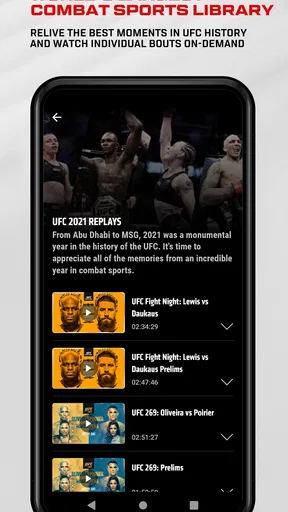
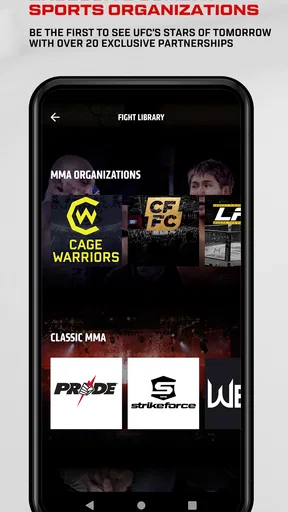
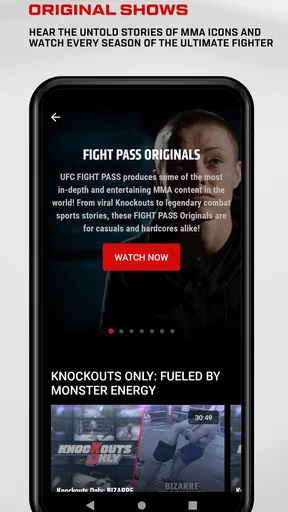
Beyond live events, the UFC app offers a variety of content, including fighter profiles, behind-the-scenes videos, and exclusive interviews. Users can also access a library of past fights and events, view fight stats, and stay updated with the latest UFC news and announcements.
Is the UFC app user-friendly for new fans?
The UFC app is designed to be user-friendly, even for new fans. It features an intuitive interface that makes navigation simple. New users can easily find schedules, fight highlights, and educational content about the sport. The app also provides notifications and updates to keep fans engaged and informed.
